
ElkNut
Got Game TechnologiesSports
4.3142.00 Reviews
- Version
- 4.0.8
- Installs
- 10.00K
- Age Rating
- Everyone
Screenshots
Our Review of ElkNut
 Analysis by Appyee
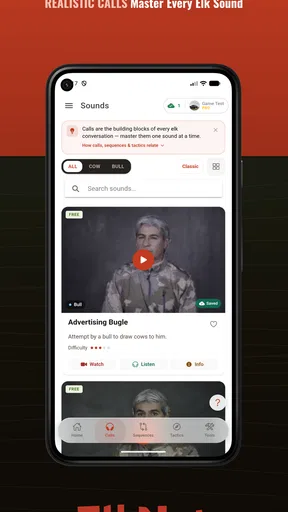
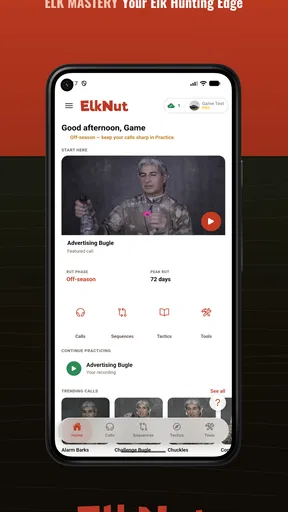
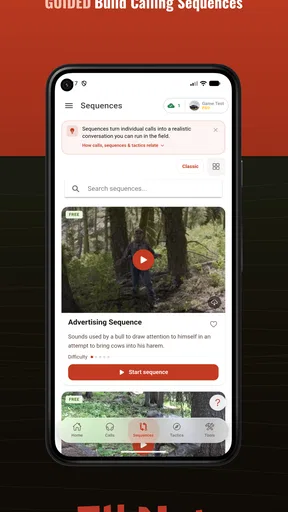
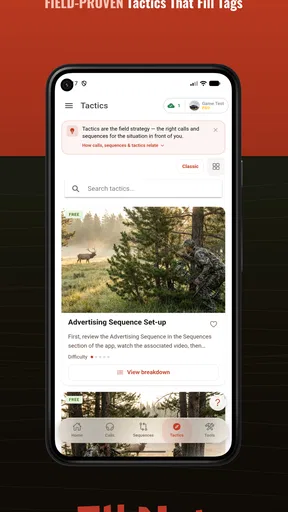
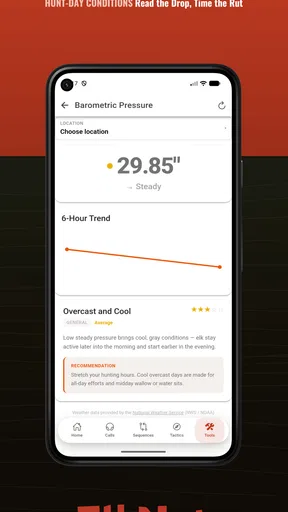
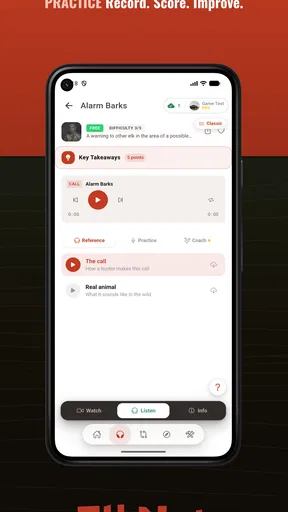
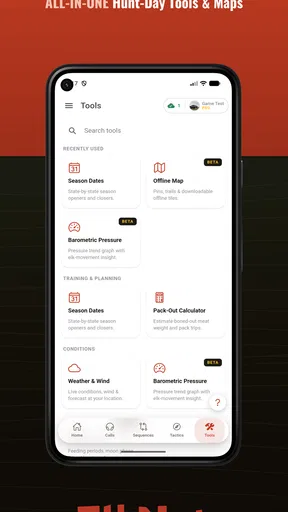
I found ElkNut most useful when I treated it as a practical elk-hunting companion rather than a complete replacement for experience in the field. It focuses on elk calls, calling sequences, tactics, hunt tools, and AI-assisted call coaching, with an offline mode that matters when a phone is being used far from reliable service. That combination gives it a clear purpose: helping a hunter prepare, rehearse, and make more deliberate decisions during a hunt.
It is a free sports app from Got Game Technologies, rated for Everyone, and it has built a modest but meaningful audience, with a 4.3 average from over two hundred ratings and more than ten thousand installs. I would not read those figures as proof that it will suit every hunting style, but they do suggest that the app has found a specific audience among people interested in elk calling and field preparation.
My overall impression is positive, with an important qualification. The app is strongest for someone who wants organized guidance and a way to practice listening and responding to elk sounds. It is less convincing for a hunter who already has a deeply established calling system and only wants a simple digital reference. The value comes from using its tools as part of a routine, not from opening it once and expecting it to make decisions for you.
How ElkNut fits into a shared hunting routine
I find a shared routine works best when ElkNut gives hunting partners a common topic to prepare around, rather than becoming a phone everyone reaches for at once. Before a trip, I would agree on which calls or sequences the group wants to review and who will carry the device; that keeps practice focused and field use discreet. The next section looks at how to make those boundaries practical without turning setup into a chore.
A useful companion when one phone serves several people
A realistic use case is a shared household device. One person may own the phone, while a partner, parent, adult child, or hunting companion uses it during preparation. In that situation, ElkNut can act as a common reference point: one person can review a calling sequence, another can listen to the coaching material, and both can discuss what they would do in a particular encounter.
This shared use works best when the phone is treated as a tool for preparation rather than passed around casually in the field. Before leaving, I would open the relevant material, check that the needed content is available offline, and agree with the other hunter on how the app will be used. That avoids the awkward moment when somebody is trying to search through a phone while the rest of the group is waiting quietly.
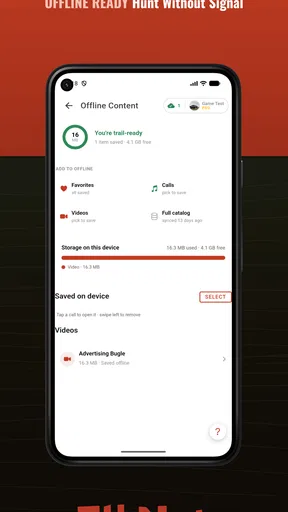
The app’s offline mode is especially important for this kind of shared arrangement. Hunting areas often make connectivity unreliable, and depending on a live connection would undermine the app’s usefulness at the exact moment it is needed. I still recommend preparing before departure, because offline access is most helpful when you already know which tools or sequences you want to consult.
There is also a practical social advantage to using one reference. Calling advice can become confusing when every member of a group follows a different video, forum post, or printed guide. ElkNut gives a household or small hunting group a single place to compare ideas. That does not make its approach universally correct, but it can make pre-hunt conversations more focused.
What happens when several people use the same installation
ElkNut should not be approached as though it were a family-management app. Its purpose is hunting education and field support, not household account administration. If several people use the same device, I would keep expectations simple: the phone is a shared tool, and each person should be clear about which material they were reviewing and what they intend to practice.
That boundary matters because a shared device can blur personal progress. If one hunter listens to coaching and another changes the practice routine, the app may no longer reflect a single person’s learning path. The solution is not to invent a complicated system around it. A small notebook, a shared note, or a short conversation before practice is enough to record which calls and sequences each person is working on.
This is one of the app’s less obvious trade-offs. Its shared usefulness comes from easy access to the same content, but that same simplicity means the household has to organize its own boundaries. I would not choose it expecting separate child profiles, household dashboards, or detailed user permissions. I would choose it when the people using it are comfortable coordinating informally.
Preparing a device before heading out
My preferred workflow would be to use ElkNut in three stages. First, I would review the relevant calling material at home, where there is time to listen carefully and think through the situation. Second, I would rehearse without rushing, paying attention to timing and sequence rather than merely copying a sound. Third, I would use the offline tools as a quiet reference during the hunt, only when doing so would not disturb the group or the surroundings.
This approach is more effective than relying on the app as an emergency instructor. AI call coaching can help a user compare what they are producing with the guidance offered, but coaching is not the same as field judgment. Wind, terrain, distance, animal behavior, and the actions of other hunters all affect a decision. The app can support preparation; it cannot observe every factor that a person in the field must weigh.
A useful tip is to practice with the phone at a normal speaking volume before going outdoors. That lets the user understand the coaching without turning the phone into a distraction. It also makes it easier to identify which parts of the app are genuinely useful for that person and which are better left for home study.
Setup boundaries, coordination, and everyday use
I would keep everyday coordination simple: decide what to review before heading out, check offline access in advance, and leave room for each hunter’s own judgment. That approach is especially helpful when one device serves several people, since shared access does not automatically mean shared progress or identical needs. Here I consider where a little planning helps, and where ElkNut should remain a focused aid rather than the center of the hunt.
Getting started without overcomplicating the experience
ElkNut is available free of charge, which makes it easy to test before committing to a particular hunting workflow. The app includes in-app purchases priced at $14.99 per item, so I would explore the free experience first and decide whether the additional material matches my needs. That is a more sensible approach than assuming every paid item is necessary for every hunter.
The current version is 4.0.8, and it supports devices running Android 7.0 or later. For an older household phone, that requirement is worth checking before planning to use the device as a dedicated hunting companion. A phone that technically runs the app but has poor battery life, limited storage, or a difficult screen may be a poor field choice even if the operating system is compatible.
I would also separate setup from field use. At home, the user can examine the calling resources, try the coaching, and decide what belongs in the day’s plan. In the field, the goal should be quick and quiet access. This distinction reduces screen time and prevents the app from becoming a source of indecision.
One of the more practical insights is that offline functionality should be treated as part of preparation, not as a promise to investigate later. Before leaving, I would open the content I expect to use and confirm that it behaves as intended without relying on a signal. That habit is useful for any remote hunting tool, but it is particularly important here because offline access is one of the app’s clearest advantages.
Coordinating calls between hunting partners
When two people hunt together, ElkNut can help create a shared vocabulary. Instead of saying “try the other call,” partners can discuss a particular sequence or coaching exercise they reviewed earlier. That can make a plan more precise, especially for people who are still learning how different calls fit into a larger approach.
I would recommend deciding in advance who is responsible for using the phone. Passing it back and forth during a quiet period is inefficient and can create unnecessary movement. One person can carry the device while the other focuses on observation, navigation, or equipment. If the group wants to compare a sequence, that discussion is better handled before entering the most sensitive part of the hunt.
The app is also useful for post-hunt review. Afterward, partners can revisit what they practiced, compare it with what happened, and decide whether the issue was timing, sound quality, positioning, or simply the unpredictability of wildlife. This turns the app into a learning aid rather than a one-day novelty.
Still, coordination has limits. ElkNut cannot settle disagreements about tactics by itself, and I would be cautious about treating an AI recommendation as the deciding voice in a group. The best use is to prompt discussion and structured practice. Experienced hunters should still apply their own judgment, while newer hunters should understand that confidence gained from coaching must be tested against real conditions.
Age context and trust in a household
The Everyone content rating makes the app approachable in a mixed-age household, but that should not be confused with suitability for unsupervised hunting decisions. A younger user may be able to explore calling concepts or listening exercises, yet the outdoor activity itself requires adult judgment, safety awareness, and knowledge of local rules. The rating describes the app’s content context, not a substitute for responsible supervision.
For a parent or guardian sharing a device with a young person, I would frame ElkNut as an educational reference. The adult can decide which parts are appropriate to practice, explain that animal behavior is not predictable, and make clear that the app does not replace instruction from a responsible, experienced person. That conversation is more valuable than simply handing over a phone and assuming the coaching will provide enough context.
Trust also matters between adults. Because the app may influence a group’s calling plan, each person should be honest about their experience level. Someone who is still learning should feel comfortable saying that they are unsure, while a more experienced partner should avoid presenting the app’s guidance as absolute. This is where the app works best: as a shared aid that supports humility and preparation.
I would skip it for a household looking for elaborate account separation or built-in family supervision. Those are not the reasons to install it. I would also skip it if the intended user has no interest in elk calling, because the app’s focused design will feel narrow compared with a broader outdoor navigation or general hunting application.
Where it beats ordinary alternatives
The usual alternatives are scattered: printed calling guides, general hunting videos, personal advice from another hunter, or a collection of notes saved on a phone. ElkNut’s advantage is that it brings elk-specific calling material, sequences, tactics, coaching, and hunt-oriented tools into one focused experience. That reduces the friction of switching between unrelated sources.
Compared with a printed guide, it is more interactive and easier to use for repeated listening and practice. Compared with random online videos, it offers a more deliberate structure and an offline option. Compared with advice from a friend, it provides a consistent reference that can be revisited when the friend is not available.
Those comparisons do not make it superior in every situation. A printed guide never needs charging, and an experienced mentor can respond to the exact terrain and behavior in front of you. A general navigation app may be a better priority for someone whose main concern is route planning, mapping, or location tracking. ElkNut earns its place when calling preparation is central to the trip.
The AI coaching is the feature I would examine most carefully. It can make practice more active than simply reading instructions, and it may help a learner notice differences in sound or delivery. But coaching can also encourage a false sense of precision. Animal calls are not a laboratory exercise, and a technically improved sound does not automatically mean the timing or tactic is right. I would use the coaching to build awareness, not to chase a perfect result.
Small limitations that affect real use
The focused scope is both the app’s strength and its main limitation. It is not a complete hunting command center. Anyone expecting broad coverage of every outdoor task may find the experience too specialized. The app’s usefulness depends heavily on whether elk calling is a meaningful part of the user’s preparation.
There is also a learning curve in deciding how much guidance to follow. New hunters may appreciate having sequences and coaching in one place, but they can become dependent on step-by-step prompts. I would deliberately practice making a plan without constantly looking at the screen, then use ElkNut to check and refine that plan. This keeps the app in a supporting role.
Paid items require another judgment call. Since the app is free to start but offers individual in-app purchases at $14.99 each, a household should decide whether one person’s needs justify the expense before buying. If several people share the device, discuss what will actually be used rather than purchasing material simply because it is available.
Finally, the phone itself remains a weak point. Battery concerns, cold weather, glare, gloves, and the risk of distraction can all make a mobile tool inconvenient outdoors. I would carry a simple backup plan and avoid making the hunt depend entirely on the app. That is not a criticism unique to ElkNut; it is a sensible boundary for any phone-based field aid.
Who should install it, and who should leave it alone?
I would recommend ElkNut to a beginner who wants a focused way to learn elk calls, a returning hunter who wants to refresh calling sequences, or a small hunting group that needs a common practice reference. It is also a good fit for someone who spends time preparing at home and values having selected material available away from service.
I would be more cautious recommending it to an advanced caller with a settled system. That person may find the coaching and organized sequences less valuable than personal experience, a trusted mentor, or a specialized reference they already use. The app can still serve as a second opinion, but it may not justify changing an established routine.
For a shared household, the best fit is a cooperative group that can agree on who uses the device, what is being practiced, and when the phone stays put. The weakest fit is a family expecting separate profiles, automatic supervision, or a full outdoor safety platform. ElkNut is a focused sports app, not a household-management solution.
My household verdict
After looking at it through the lens of shared use, I see ElkNut as a practical specialist rather than an all-purpose hunting app. Its free entry point, offline mode, elk-focused material, and AI call coaching give it a clear role in preparation. The app is most valuable when a person uses it repeatedly, takes notes on what they are learning, and brings that knowledge into a broader plan.
For a household or hunting partnership, I would install it on the device that will actually travel, review the desired content together, and establish simple boundaries before the trip. I would not assume that every user needs the same material, and I would not let the app replace communication between partners. Those small decisions make the shared experience smoother.
My final recommendation is straightforward: try it if elk calling is a real part of your outdoor plans, especially if offline access and guided practice appeal to you. Keep your expectations realistic, evaluate any paid items carefully, and treat the coaching as assistance rather than authority. ElkNut is at its best when it helps a hunter prepare with more intention, not when it is asked to do the hunting for them.
Verdict
Strengths of ElkNut
- Works offline, making it useful in areas with limited or no internet access.
- Simple controls are easy to learn, even for first-time players.
- Short gameplay sessions fit well into quick breaks or commutes.
- Lightweight installation should use minimal storage on most devices.
- Progression provides a clear sense of achievement as challenges increase.
Limitations of ElkNut
- May feel repetitive after extended play sessions.
- Limited content can reduce long-term replay value for some users.
- Difficulty may become uneven as later challenges are introduced.
- Some features may require patience or repeated attempts to master.
- Older devices could experience occasional performance issues.
Similar Picks in This Category
View All
BeSoccer: Soccer Live Score
BeSoccer apps4.3

Cricbuzz - Live Cricket Scores
Cricbuzz.com3.7

NFL
NFL Enterprises LLC2.4

Da Fit
MO YOUNG LIMITED3.6

ESPN
Disney4.5

LiveScore: Live Sports Scores
LiveScore Limited4.5
Frequently Asked Questions
What is ElkNut and what can I use it for?
ElkNut is an app designed to help users organize, review, or manage information related to elk hunting and outdoor activities. Before downloading, check the current store description to confirm its exact tools and supported regions, since features may vary by version. Depending on the release, it may provide useful planning, reference, tracking, or community-oriented functions for hunters and outdoor enthusiasts.
Is ElkNut free to download and does it require a subscription?
ElkNut may be available as a free download, but some features could require in-app purchases, a premium upgrade, or a recurring subscription. We recommend checking the Google Play Store or Apple App Store listing before installing it, especially the pricing section and trial terms. Also review whether payments renew automatically and whether certain content is limited to premium users.
Does ElkNut work offline or require an internet connection?
The answer depends on which part of ElkNut you are using. Basic stored information may be accessible without a connection, while account synchronization, maps, updates, community features, or cloud-based tools may require mobile data or Wi-Fi. If you plan to use the app in remote hunting areas, test its offline behavior beforehand and download any available content while you still have reliable internet access.
What permissions and personal information does ElkNut request?
Before installing ElkNut, review the permissions shown on your device and the developer’s privacy policy. An app in this category may request access to location, storage, notifications, camera, or account information, depending on its features. Location access can be particularly sensitive if you save hunting spots or trip details, so confirm how data is stored, shared, protected, and deleted.
Is ElkNut suitable for beginners, and is it available on both Android and iOS?
ElkNut can be useful for newcomers as well as experienced outdoor users, but its learning curve depends on the tools included in the current version. Beginners should look for clear instructions, reliable help content, and simple navigation before relying on it in the field. Availability may differ between Android and iOS, so verify that your device and operating-system version are supported.
